Compare with
Looking for an AppScreens alternative?
ezscreenshots is $39/year flat (vs AppScreens' $99-$180/year), with a real free tier you can try without signing up, no project cap, and AI translation to 30+ App Store locales included at the base Pro tier.
At a glance
- Browser-based, no install, no signup for free tier
- Free tier: 3 full-res exports / month, no watermark
- 100% client-side — images stay in your browser
- Live-draggable 3D perspective + zoom callouts
- AI translation to 30+ locales (Pro)
- Multi-screen ZIP export (Pro)
- No usable free tier — paywall blocks any project creation
- 10 project cap on Pro · unlimited only on Scale
- 5 localizations on Pro · 80+ on Scale
- Auto-upload to App Store Connect / Play Console
- Custom Product Pages + PPO support (Scale tier)
- Premium template marketplace, layered editor
The short version
AppScreens has a polished landing page, a hard paywall, and one genuinely impressive feature: auto-upload directly to App Store Connect and Play Console. If you're doing a lot of releases and want to skip the "drag the ZIP into App Store Connect" step, that's a real workflow advantage. Pro is $99/year (capped at 10 projects, 5 localizations); Scale is $180/year for unlimited projects, 80+ localizations, and Custom Product Page / PPO push support. The catch: there's no functional free tier — even "Blank Project" hits a paywall before you can render anything.
ezscreenshots is the opinionated, browser-based alternative. The free tier gives you 3 full-resolution exports per month with no watermark and full commercial use, no signup required. Pro unlocks unlimited exports plus AI translation to 30+ App Store locales for $39/year flat, with no project caps. It runs 100% in your browser — your screenshots never leave your device. No auto-upload to stores (yet), but multi-screen ZIP export is one click and drops cleanly into App Store Connect.
The honest version: if auto-upload to stores is a workflow you'll actually use repeatedly, AppScreens earns its price. If you mostly just need to make screenshots — without paywalls, project caps, or the $99-$180/year price tag — ezscreenshots is the sharper tool. Below is the side-by-side; picked an unfair fight? Let us know.
See the editor difference
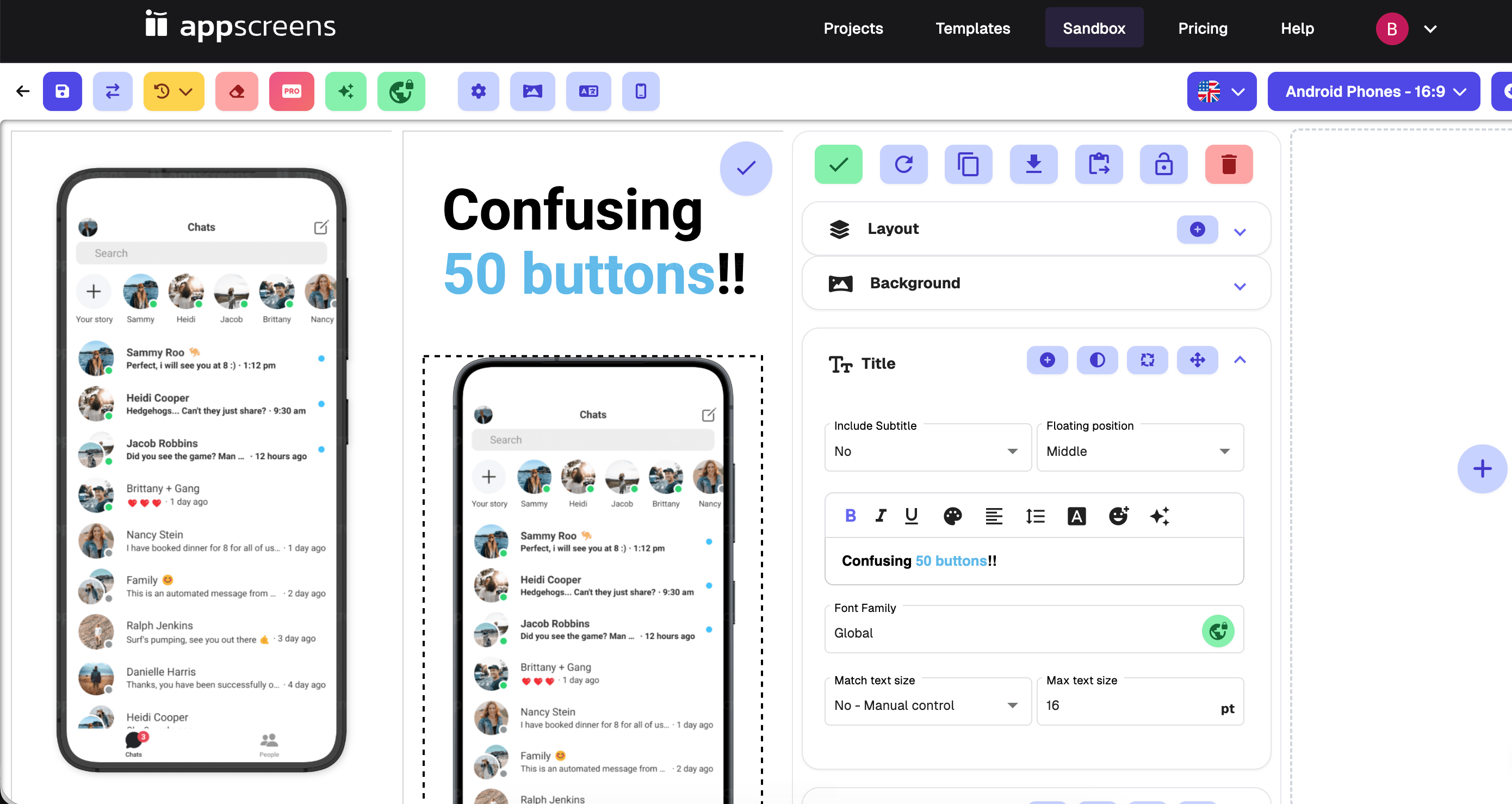
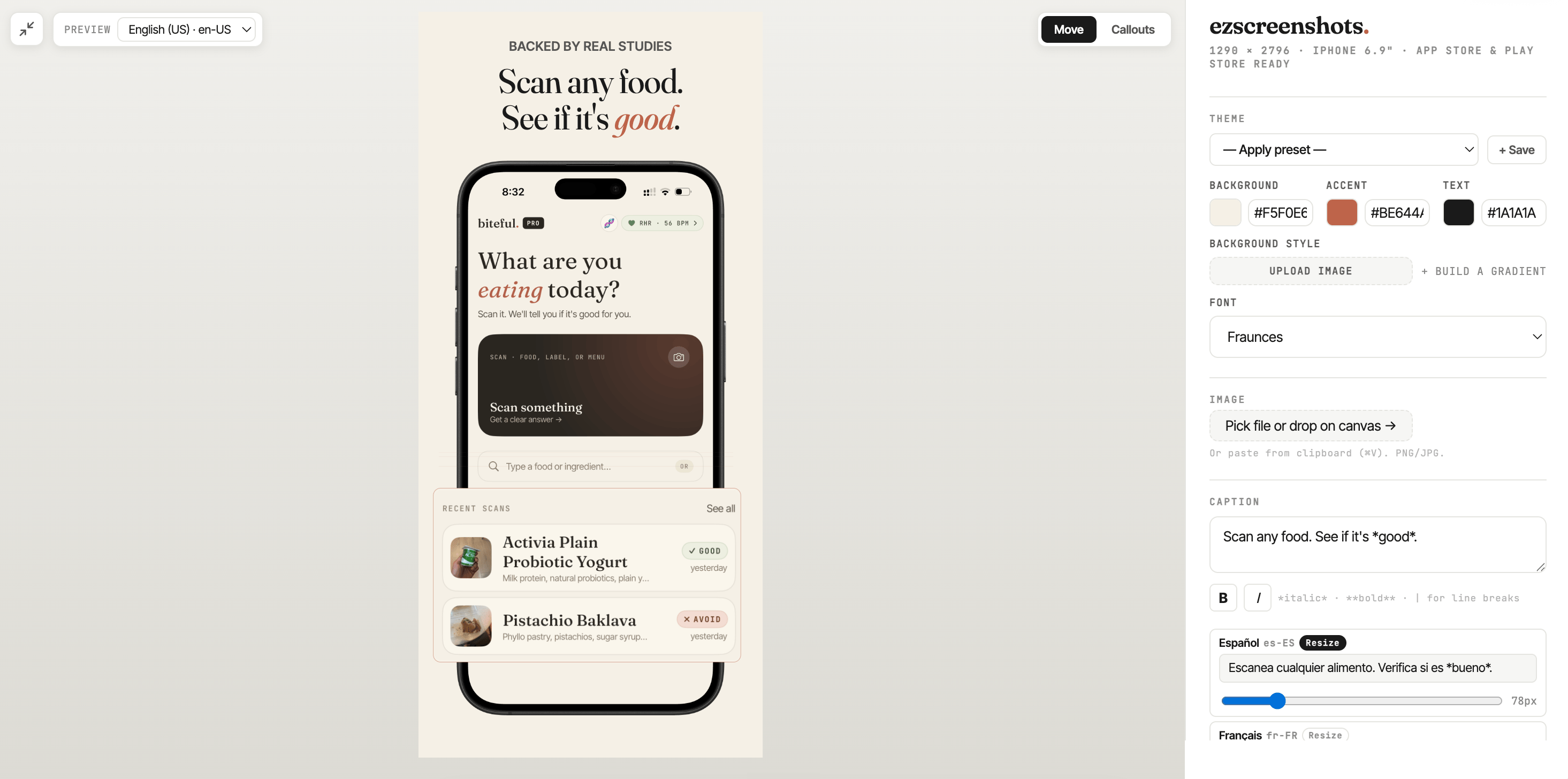
AppScreens' editor is a Sandbox panel stacked with toggle controls — Layout, Background, Title with "Include Subtitle" / "Floating position" / "Match text size" / "Max text size" sliders, plus a rich-text toolbar (bold, italic, underline, color, alignment, line height). Powerful, but every option is one more decision before you ship. ezscreenshots strips it back. Here are the two editors side-by-side.
Feature-by-feature
Researched on May 19, 2026 against AppScreens' public homepage and pricing page. If anything's out of date, email support@ezscreenshots.com and we'll update it.
| Feature | ezscreenshots | AppScreens |
|---|---|---|
| Pro annual price | $39 / year | $99 / year (Pro) · $180 / year (Scale) |
| Monthly billing | $9 / mo | $25/mo (Pro) · $50/mo (Scale) |
| Free tier you can actually use | ✓ 3 full-res exports / month, no watermark, no signup | ✗ Paywall blocks creating any project |
| Signup required to try | ✓ No signup for free tier | ✗ Sign up → paywall |
| Project cap | ✓ Unlimited (free and Pro) | 10 on Pro · Unlimited on Scale ($180/yr) |
| Localizations included | ✓ AI translation to 30+ locales (Pro) | 5 on Pro · 80+ on Scale |
| Auto-upload to App Store / Play Store | ✗ Manual upload of ZIP | ✓ Direct push from editor (Pro) |
| Custom Product Pages / PPO support | ✗ | ✓ Scale tier only |
| Where your projects live | ✓ Your browser only (100% client-side) | AppScreens servers (cloud) |
| iPhone / iPad / Android frames | ✓ | ✓ |
| Template library | No templates — start blank, build fast | Premium templates (Pro+) |
| Editor learning curve | ✓ Drag-drop, single canvas, minimal controls | Layered Sandbox panel with per-element controls and rich-text toolbar |
| Live-draggable 3D perspective | ✓ Real tilt, any angle | Template-driven, preset angles |
| Zoom callouts (magnified overlays) | ✓ | ✗ |
| Custom font upload | ✓ Upload your own .ttf/.otf | Built-in font selector |
Which one's for you?
Pick AppScreens if…
- Auto-upload to App Store Connect and Play Console is a workflow you'll use repeatedly — this is their best feature
- You need to push to Custom Product Pages (CPP) or Product Page Optimization variants from inside the editor (Scale tier)
- You localize into 80+ App Store regions and need that specific scale (Scale tier)
- You're shipping enough updates that $99-$180/year is comfortably below the time it saves you
- You're fine signing up and hitting a paywall before you can test the product
Pick ezscreenshots if…
- You'd like a real free tier you can try without a credit card or signup
- You want to pay $39/year flat, not $99-$180/year
- You ship for more than 10 apps and don't want to hit a project cap
- You localize for App Store regions and want AI translation to 30+ locales included at the base tier
- You want zoom callouts and live-draggable 3D perspective on the screenshot itself
- You value privacy — your screenshots stay on your device, never uploaded
- You're fine dragging the export ZIP into App Store Connect manually (no auto-upload yet)
Switching from AppScreens? Get 50% off.
Email support@ezscreenshots.com with proof of an active AppScreens subscription (a screenshot of your billing page works), and we'll send you a 50%-off coupon for your first year of ezscreenshots Pro. First year ends up around $19.50 instead of $39.
Email support to claim →What devs are saying
"This is exactly the kind of internal tool indie devs end up needing. Most screenshot makers are built like design suites, when the real need is just: drop screenshot, edit headline, export clean PNG."
 mufenglabs
"Bruh this is awesome, and came just in time as I need to update all my screenshots. You hero."
te_abstract_art
"Love that it's just HTML + CSS. Really nice UI to see it change in realtime."
Human-Cherry-1455
"Really clean tool man, well done. This is painful to do well."
atheistjebus
FAQ
Does AppScreens have a free tier?
Not a usable one. AppScreens shows a paywall the moment you try to create a project — template, blank, or AI Screenshot Creator all hit the same gate ("You cannot create anymore projects without a Pro plan"). You can look at the landing page and browse templates, but exporting anything requires Pro at $99/year or $25/month. ezscreenshots is the opposite: 3 full-resolution exports per month free, no signup, no watermark, full commercial use.
What about AppScreens' auto-upload to the App Store?
Honest answer: auto-upload to App Store Connect and Play Console is a real feature AppScreens has and ezscreenshots doesn't. If pushing assets straight from the editor saves you meaningful time across many releases, that's a fair reason to pick AppScreens. ezscreenshots exports a clean ZIP ready to drag-drop into App Store Connect — close, but not one-click. AppScreens' Custom Product Pages and Product Page Optimization push is only on the Scale tier ($180/year).
What's the project cap?
AppScreens Pro caps you at 10 projects. To get unlimited projects, you need Scale at $180/year. ezscreenshots has no project cap on free or Pro — you can have as many as you want.
Will my screenshots stay private?
Yes — ezscreenshots runs entirely in your browser. Your screenshots are never uploaded to any server. There is no server. AppScreens, by contrast, is cloud-based and stores your projects on its servers (which is also what enables their auto-upload feature).
How does the 50%-off switcher discount work?
Email support@ezscreenshots.com with a screenshot of your active AppScreens billing page. We'll send you a 50%-off coupon for your first year of ezscreenshots Pro (so $19.50 instead of $39 for year one). Manual approval — one coupon per email, no expiry on the offer itself.
Can I cancel anytime?
Yes. ezscreenshots Pro is a standard Stripe subscription. Cancel anytime from the customer portal — you keep Pro access through the end of your billing period.
Do you have a free trial of Pro?
The free tier gives you 3 full-resolution exports per month with no watermark — enough to do a single small App Store submission. If you need more, the $9/mo plan is the lightest paid option, or annual Pro is $39/year for unlimited exports plus AI translation and multi-screen ZIP export.
Ready to make your screenshots?
No signup. No clutter. Free tier exports real PNGs.
Launch ezscreenshots →