Compare with
Make store-ready screenshots in minutes
Drop a raw screenshot, add a caption and a background, and export App Store and Play Store images at the exact sizes the stores expect. No design skills, no signup, no watermark — it all runs right in your browser.
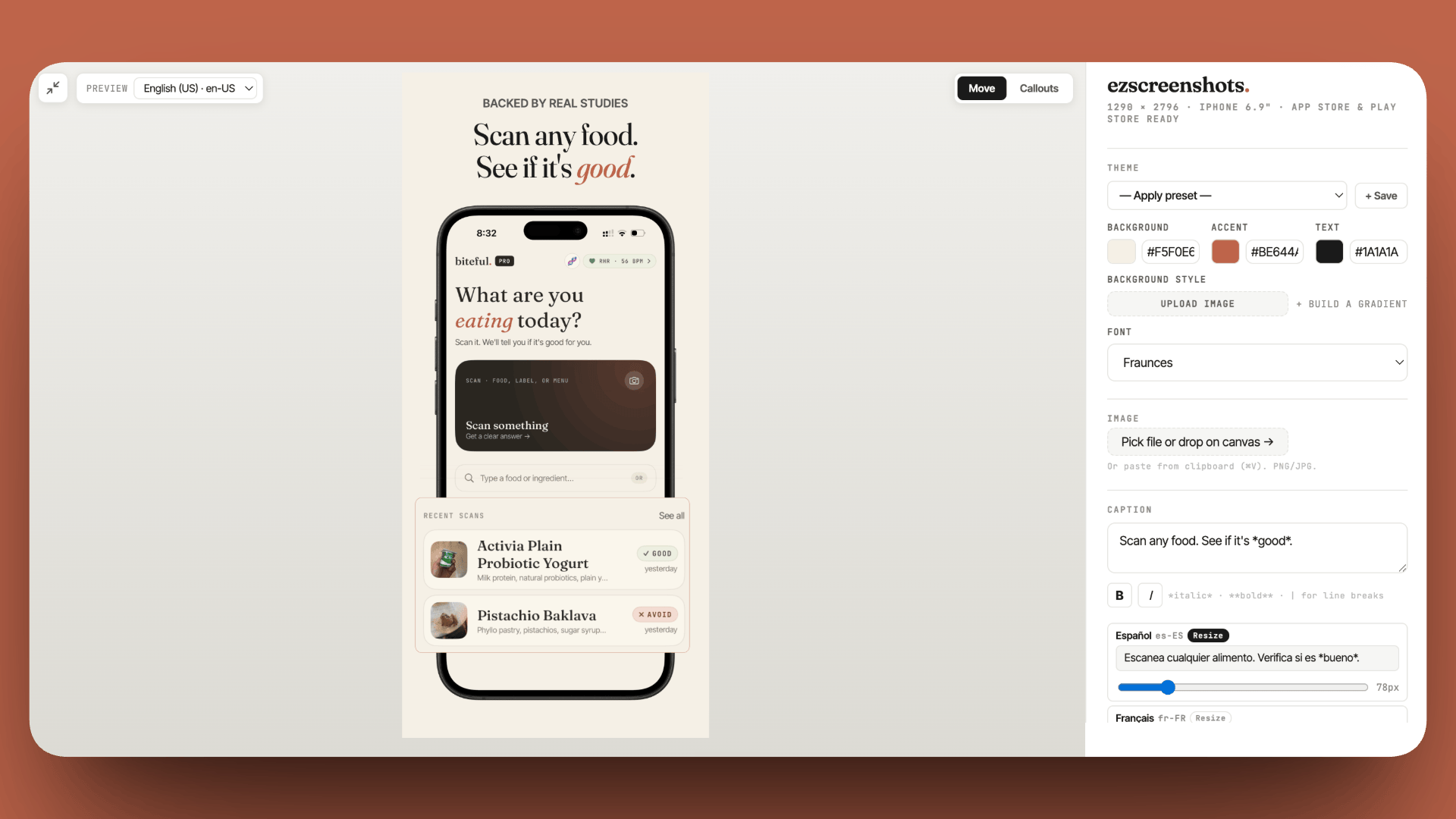
From raw screenshot to store-ready in four steps
Most screenshot makers are built like design suites — layers, templates, rich-text toolbars. The real job is simpler: drop screenshot, write headline, export clean PNG. That's the whole flow here.
Drop your screenshot
Drag a screenshot in, paste from the clipboard, or pick a file. It snaps onto the canvas at the right scale instantly.
Add a caption
Type a headline and subtitle. Pick from curated display fonts or upload your own. The layout adjusts live as you edit.
Style the background
Auto-detected color, a gradient, a device frame, a 3D tilt, or a zoom callout on the part that matters most.
Export at store sizes
Pick a device preset and export a full-resolution PNG — or a ZIP of every size and language at once for App Store Connect.
Everything the App Store and Play Store ask for
The generator covers the things that actually get screenshots rejected or that take the longest to do by hand — correct dimensions, frames, captions, and localization.
Exact store dimensions
Presets for iPhone, iPad, Mac, Apple Watch, and Android — the pixel sizes App Store Connect and Play Console require.
Device frames
Drop your screenshot into a clean iPhone, iPad, or Android frame, or leave it bezel-free. Your choice, one toggle.
Captions & custom fonts
Headlines and subtitles with eight curated display fonts, or upload your own .ttf / .otf to match your brand.
Backgrounds & gradients
Auto-detect a color from your screenshot, or set a custom gradient. Solid, export-safe — no grey checkerboard bugs.
3D perspective & zoom callouts
Tilt the screenshot to any angle live, or drop a magnified callout over the feature you want reviewers to notice.
AI localization & batch export
Translate captions into 19 locales and export every device size and language in a single ZIP (Pro).
Built for every store size
Pick a preset and the canvas resizes to the exact dimensions the store expects — so exports never bounce for being the wrong size. Unsure which you need? See the full App Store screenshot sizes guide.
| Preset | Pixel size | Used for |
|---|---|---|
| iPhone 6.9" | 1290 × 2796 | iPhone 16 Pro Max and newer — the current required size |
| iPhone 6.5" | 1242 × 2688 | iPhone 11 Pro Max / XS Max era |
| iPhone 6.1" | 1179 × 2556 | iPhone 14 / 15 standard |
| iPhone 5.5" | 1242 × 2208 | Older Plus-size iPhones (still accepted) |
| iPad 12.9" | 2048 × 2732 | iPad Pro — required if your app supports iPad |
| Android phone | 1080 × 1920 | Google Play Console phone screenshots |
| Mac | 2880 × 1800 | Mac App Store — required if your app ships on macOS |
| Apple Watch | 422 × 514 | watchOS App Store screenshots |
Free to start, $39/year to go unlimited
- 3 full-resolution exports per month
- All device sizes, frames, fonts, and backgrounds
- Zoom callouts included
- Unlimited saved projects
- 100% client-side — screenshots stay on your device
- Unlimited full-resolution exports
- AI translation to 19 App Store locales
- Multi-screen ZIP export — every size & language at once
- 3D perspective tilt
- Emoji & badge overlays
What devs are saying
"This is exactly the kind of internal tool indie devs end up needing. Most screenshot makers are built like design suites, when the real need is just: drop screenshot, edit headline, export clean PNG."
 mufenglabs
"Bruh this is awesome, and came just in time as I need to update all my screenshots. You hero."
te_abstract_art
"Love that it's just HTML + CSS. Really nice UI to see it change in realtime."
Human-Cherry-1455
"Really clean tool man, well done. This is painful to do well."
atheistjebus
FAQ
Is this App Store screenshot generator free?
Yes. The free tier gives you 3 full-resolution exports per month with no watermark and no signup — enough to ship a small App Store or Play Store submission. Pro lifts the export limit and adds AI localization and multi-screen ZIP export for $39/year flat (or $9/mo).
Do I need design skills to use it?
No. You drop a raw screenshot, type a caption, and pick a background — the generator handles layout, spacing, and the export size for you. There are no layers, no rich-text toolbars, and no templates to wrangle. The single canvas updates live as you edit, so you can see exactly what ships.
Does it work for both the App Store and Google Play?
Yes. There are presets for iPhone (6.9", 6.5", 6.1", 5.5"), iPad 12.9", Mac, Apple Watch, and Android phones. Pick a preset and the canvas resizes to the exact pixel dimensions App Store Connect and Google Play Console expect, so exports drop in without getting bounced for the wrong size. See the full screenshot sizes guide if you're unsure which you need.
Are my screenshots uploaded anywhere?
No. ezscreenshots runs entirely in your browser. Your screenshots never leave your device — there is no backend, no account, and no upload. The exported PNG is generated locally and downloaded straight to your machine.
Can I generate screenshots in multiple languages?
Yes, on Pro. AI translation localizes your captions into 19 App Store locales, and a single multi-screen ZIP export gives you every device size and language in one download. Here's how to localize your screenshots without redoing them each time.
How is this different from Figma or Photoshop?
You could build screenshots in a general design tool, but you'd recreate the frames, the export sizes, and the per-language variants by hand every release. This generator is purpose-built for store screenshots: the sizes, frames, and localization are one click each, and exports are already named and dimensioned for App Store Connect and Play Console.
Keep reading
Generate your store screenshots now
Free tier exports real, full-resolution PNGs. No signup, no watermark.
Open the generator →