The most expensive mistake in App Store submission
A developer on r/iosdev posted something rare: a complete, honest account of every rejection Apple handed them during a 3-week, 5-round review process for a social marketplace app. Most developers quietly fix rejections and move on. This one documented all of it.
The post hit 109 upvotes because every item on the list is something another developer has hit — or will hit. Apple's App Store Review Guidelines are comprehensive, but the gap between reading them and knowing which clauses apply to your specific app is wide enough to cost you three weeks.
This is the categorized list of every rejection they documented, with the specific fix for each.
Screenshot and listing rejections (Guideline 2.3)
Screenshots are the most common single category of App Review rejection — and the most preventable. Guideline 2.3.3 requires that screenshots "accurately represent the app experience." That clause covers a lot of ground.
The screenshot-specific rejection reasons we've tracked across the developer community — marketing overlays that obscure the actual UI, screenshots captured in a different OS version or on a device that isn't supported, showing features in screenshots that aren't in the current build, and cropping the status bar in ways that break the "real device" framing — are covered in detail in our post on what Apple means by "accurately representing the user experience."
"Features not in the current build" trips people up specifically on push notifications — describing or mocking up a notification feature that isn't actually wired up yet. If you're implementing push, our push notification certificate setup guide covers getting it working end to end before you screenshot it.
For the mechanical side — making sure your screenshots are the correct dimensions for every required device size — ezscreenshots handles that automatically. Pick your device preset, drop in your Simulator captures, add captions, export. The dimensions are correct by default.
User safety and UGC rejections (Guidelines 1.2, 5.1.1)
Rejection: No block feature in a social app (Guideline 1.2)
Apple's Guideline 1.2 requires that apps with user-generated content or social interactions provide a mechanism for users to block abusive accounts. This developer had a report button — but not a block button. That wasn't enough.
The fix: If your app has chat between strangers, user profiles, or any form of social interaction, you need in-app blocking, not just reporting. The block must prevent the blocked user from contacting or interacting with the blocker entirely — not just flag the account for review.
Rejection: Vague location permission strings (Guidelines 5.1.1 + 5.1.5)
Their original NSLocationWhenInUseUsageDescription read: "Location is needed for app to function." Apple wants specificity — what data is used, how, and why.
The fix: Be explicit. Their approved string became: "Your location is used to show items available near you and to display your city on your profile. It is never shared without your consent." Two additional requirements caught alongside this: don't request location before calling requestPermission(), and only request location when it's actually needed — not on app startup if location-dependent features aren't in the main flow.
Privacy and account management rejections (Guideline 5.1.1)
Rejection: Account deletion via email (Guideline 5.1.1(v))
Since June 2022, Apple requires programmatic in-app account deletion. A "delete account" button that opens the Mail app with a pre-filled message to support is not compliant. This developer caught it before submission — Apple would have flagged it on review.
The fix: Account deletion must be initiated server-side from within the app, with a confirmation step, and the deletion must actually execute (or be queued to execute). No email flows, no "we'll process it within 30 days." The review team verifies this by actually testing account deletion with the demo credentials you provide in App Store Connect — they deleted one of this developer's test accounts during review.
Rejection: Requesting location before permission (Guideline 5.1.2)
Related to the location string issue: calling your location API before presenting the system permission dialog is a violation. The permission prompt must appear before any location access occurs.
The fix: Gate all location calls behind a permission state check. If permission isn't granted, show your permission prompt before attempting location access.
Subscription and payment rejections (Guideline 3.1.2)
Rejection: Missing Apple EULA link for subscription apps (Guideline 3.1.2(c))
If your app has subscriptions, Apple's standard End User License Agreement must be linked in two places: your App Store description and inside the app. Not your own terms of service — Apple's EULA. This developer got rejected twice on this point: the first rejection said "add links to description." They added their privacy policy and terms. Wrong. Apple meant Apple's EULA. The second rejection said the same thing, with no additional clarification.
The fix: Add https://www.apple.com/legal/internet-services/itunes/dev/stdeula/ as the EULA link in your App Store Connect metadata and in your app's subscription or settings screen. The lack of clarification in Apple's rejection messages on this is a known frustration — multiple developers have hit the exact same two-round cycle.
IAP group structure (App Store Connect, not a guideline)
A comment in the thread surfaced a related issue that trips up subscription apps: IAP grouping in App Store Connect. Apple wants all subscription tiers — monthly, annual, etc. — in a single subscription group. A common mistake is creating separate groups per tier ("Premium Monthly Users" and "Premium Annual Users"). That structure causes submission loops where the IAP section won't attach correctly to the app record.
The fix: One subscription group ("Premium"), with tiers inside it (Monthly, Annual). If your current setup is wrong, deleting and recreating the IAPs from scratch in the correct structure is usually faster than trying to migrate the existing records.
Platform compatibility near-misses
These didn't cause rejections for this developer, but they note them as things that would have:
iPad crashes (Guideline 2.1)
Even if your app is iPhone-only, it must function on iPad. An iPhone app that crashes on iPad is grounds for rejection. A comment in the thread confirmed this: "Had my app rejected initially because of it crashing on iPad even though it's only intended for iPhone." The app doesn't need to be optimized for iPad — it just needs to run without crashing.
For context on how to handle iPad requirements for an iPhone-only app, see our guide on iPad screenshots for iPhone-only apps.
IPv6 networking (Guideline 2.5.5)
Apple's review lab runs a NAT64/DNS64 network that simulates IPv6-only connectivity. Apps that work fine on standard networks can fail if they have hardcoded IPv4 addresses (like staging API endpoints: http://192.168.1.100/api). The NAT64 translator can't map literal IPv4 addresses.
The fix: Remove all hardcoded IPv4 literals. If you're connecting to your API by domain name using a standard HTTP client (URLSession, Dio, Alamofire), you'll pass automatically — the NAT64 translation is transparent for domain-name-based requests.
Age rating (App Store Connect)
Apps with UGC, chat between strangers, or location-sharing must be rated 12+ minimum. An incorrect age rating isn't always a rejection at submission — but it can trigger removal after the fact if Apple determines the rating is inaccurate. For social apps, Apple specifically required this developer to confirm that age validation was enforced within the app.
Support URL in App Store Connect
The support URL in your App Store metadata must resolve to a real, working page. Reviewers check it. A dead link or a URL that redirects to your landing page's 404 is a rejection trigger. One detail from this developer: the reviewer appeared to also check the legal documents linked from their landing page during the review window.
The pre-submission checklist
| Category | Check | Guideline |
|---|---|---|
| Screenshots | Reflect current UI, correct dimensions, no misleading captions | 2.3.3 |
| Social / UGC | Block feature implemented (not just report) | 1.2 |
| Location | Permission string names specific use cases; permission requested before location accessed; only requested when needed | 5.1.1, 5.1.5 |
| Account deletion | In-app programmatic deletion with confirmation; no email flow | 5.1.1(v) |
| Subscriptions | Apple's EULA linked in App Store description and inside app; all tiers in one subscription group | 3.1.2(c) |
| Age rating | UGC + chat = 12+ minimum; age validation enforced in-app | App Store Connect |
| iPad | App runs without crashing on iPad, even if iPhone-only | 2.1 |
| IPv6 | No hardcoded IPv4 addresses in production build | 2.5.5 |
| Metadata | Support URL is live and functional; legal documents linked from support site are accessible | App Store Connect |
What Apple's rejection messages don't tell you
The EULA rejection stands out as a systemic problem with App Review communication. The developer got the same rejection message twice — "add links to description" — with no indication that they'd added the wrong type of link. Apple Review messages describe the outcome ("the link is missing") without describing what the correct fix looks like. This is a known pattern: reviewers flag against the guideline, but they can't advise on implementation.
The practical implication: when you get a rejection that matches something in a guidelines section, read the entire section, not just the specific clause cited. The EULA requirement lives in 3.1.2(c) alongside the subscription setup requirements — reading the whole section would have surfaced it on the first round.
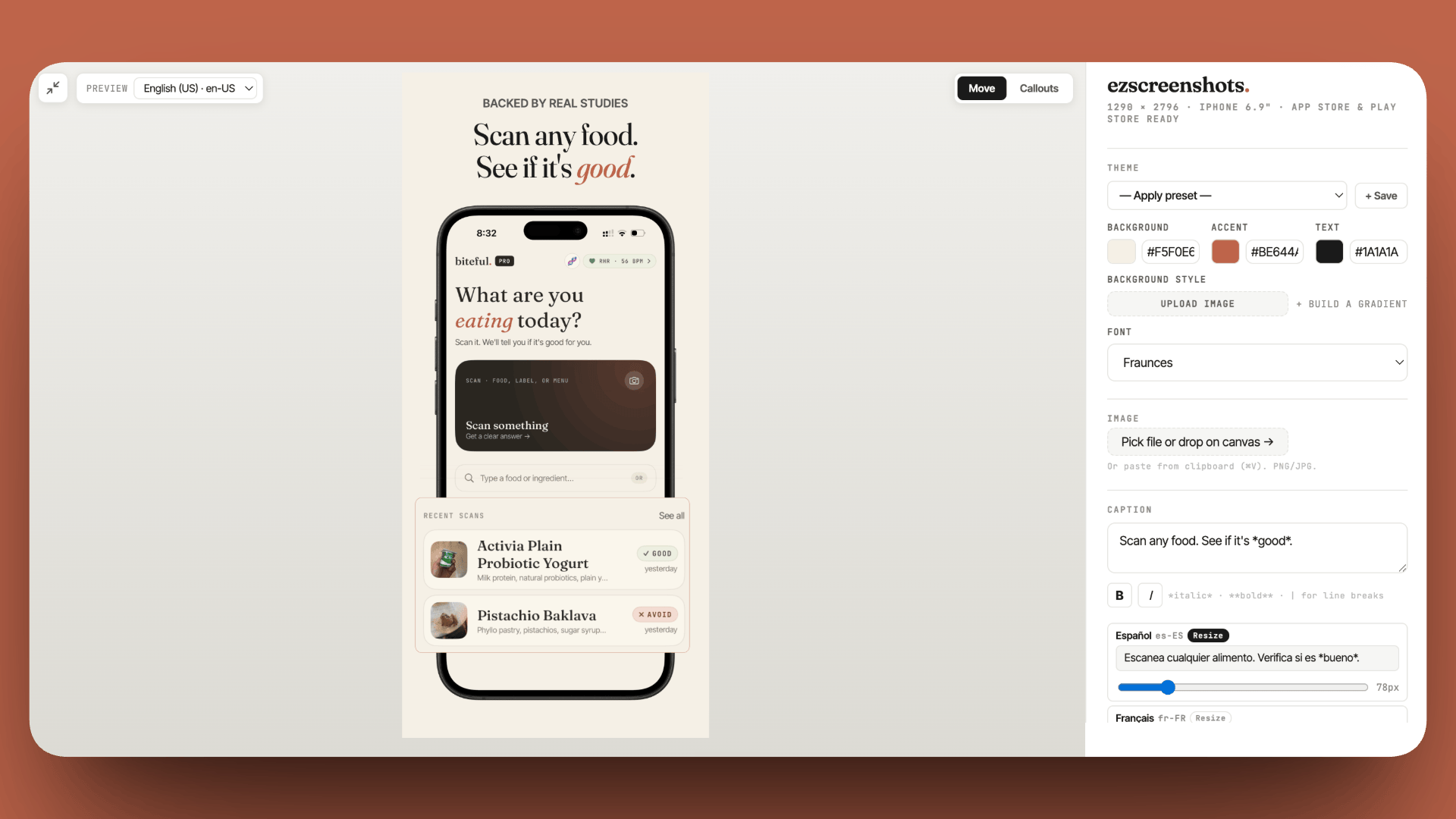
Eliminate screenshot rejections before you submit
Guideline 2.3.3 rejections are almost always about wrong dimensions or UI that doesn't match the build. Drop in your Simulator screenshots, add accurate captions, export at the exact dimensions Apple requires. Free, no account needed.
Try ezscreenshots →Summary
- Screenshots (2.3.3): must reflect actual current UI at correct dimensions — the most common and most preventable rejection category
- Block feature (1.2): social apps with any user interaction require block, not just report
- Location strings (5.1.1, 5.1.5): must name specific use cases; permission must be requested before location is accessed
- Account deletion (5.1.1(v)): programmatic in-app deletion required since June 2022 — email flows are not compliant
- Apple EULA (3.1.2(c)): subscription apps must link Apple's EULA (not your own ToS) in both the App Store description and inside the app
- IAP grouping: all subscription tiers must be inside a single subscription group in App Store Connect
- iPad (2.1): iPhone-only apps must still run without crashing on iPad
- IPv6 (2.5.5): no hardcoded IPv4 addresses in production builds — domain-name-based API calls are fine
- Rejection messages: often describe the symptom, not the fix — read the full guideline section, not just the cited clause