100 downloads in a week is achievable — here's what it takes
A developer on r/iosdev shared their milestone: 3 months of evenings and weekends, one launch, 100+ downloads in the first week. The comments were a mix of congratulations and questions — "how are you advertising?" and "what's your income?" The post had 51 upvotes, which is decent signal that this outcome is aspirational for many first-time developers.
100 downloads in week one is a real, achievable target for a well-executed launch. It's not guaranteed — the app needs to solve a real problem — but it's also not luck. There's a specific set of actions, done in the right order, that meaningfully increase the probability. Here they are.
Before you submit: the listing checklist
Most first launches are hurt by a weak App Store listing, not a weak app. The listing is what turns an App Store impression into a download. Get these right before you hit submit.
1. App name and subtitle
Your app name appears in search results and should include your primary keyword if it fits naturally. Your subtitle (30 characters) is prime keyword real estate — Apple indexes it, and it appears directly under your name in search results. Don't waste it on a tagline. Use it for a keyword-rich description of what the app does: "Daily Habit Tracker & Streak" beats "Build Better Habits" for search visibility.
2. Keywords field
The 100-character keyword field is indexed by Apple but not visible to users. Use every character. Don't repeat words already in your name or subtitle — Apple already indexes those. Don't use spaces between keywords if you can avoid it (commas separate, spaces count toward your 100). Research 3–4 competitor apps and note keywords they rank for that you don't have in your name or subtitle — those go here.
3. Screenshots that communicate value in two seconds
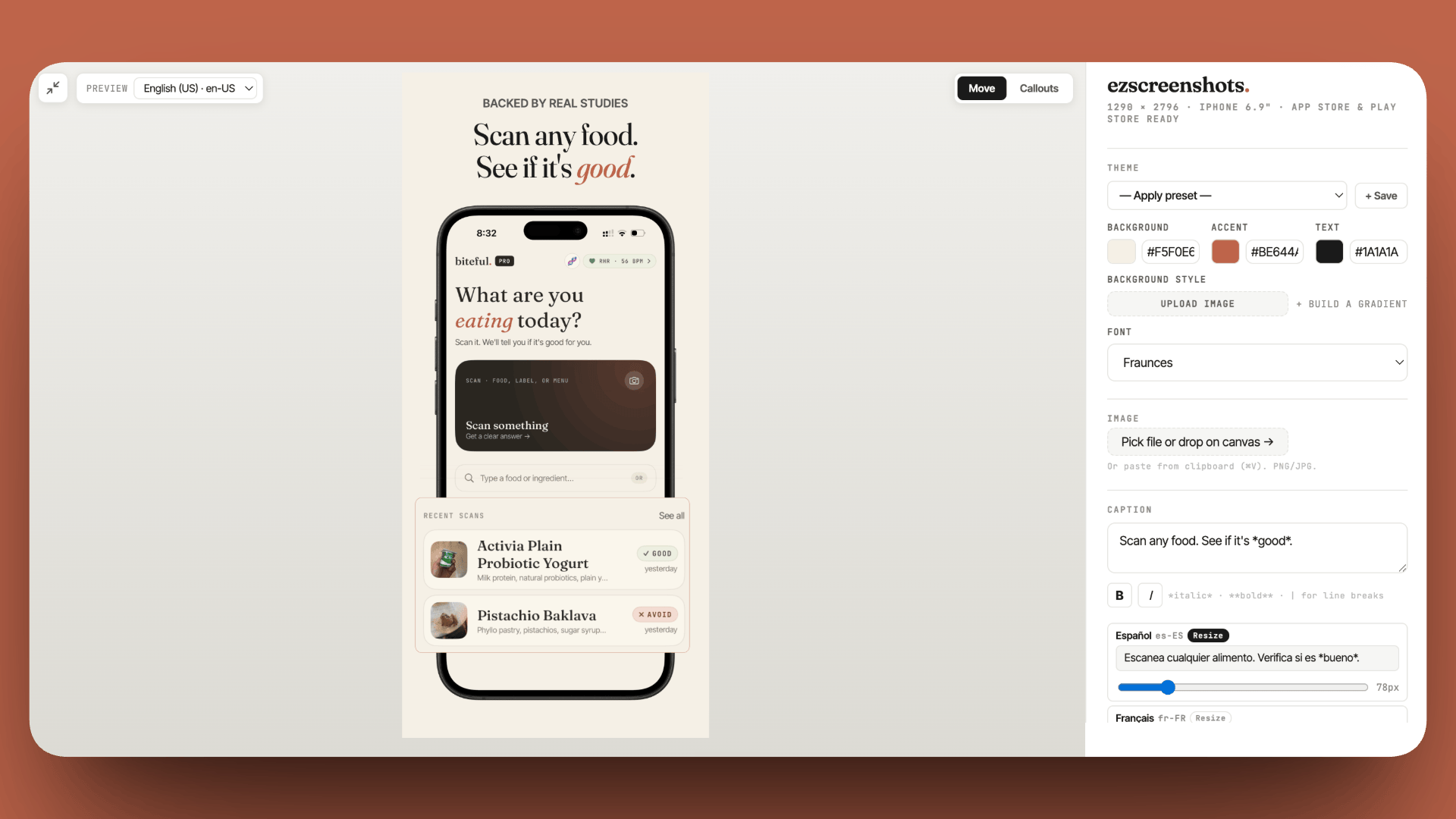
App Store search results show your icon and the beginning of your first screenshot. Users decide whether to tap in under two seconds. Your first screenshot should make one specific benefit immediately clear — not a tour of every feature, not a generic hero shot. "Log a workout in 3 taps" is a first screenshot. "The best workout app" is not.
This is the single highest-leverage listing improvement available to most developers. A tool like ezscreenshots makes it fast — drop in your Simulator screenshot, add a crisp caption, export at the correct dimensions. Polish here pays dividends for the entire life of the app.
4. Description
The first three lines of your description appear before the "more" fold — make them count. Lead with the core benefit ("InfoDrizzle delivers your morning news in 60 seconds, tailored to what you actually care about"), not with backstory about how you built the app. Bullet points for features work well in the body. End with a call to action and your support email.
Apple doesn't index the full description for search — only the name, subtitle, and keywords field. But users do read descriptions when they're on the fence, and a well-written description converts them.
5. App icon
Your icon appears in search results before users even read your name. It should be distinct at small sizes (the search result thumbnail is tiny), and it should communicate category and tone. A clean, simple, distinctive icon outperforms a detailed complex one at App Store scale. If you're not a designer, reference the top 3–5 apps in your category and identify what makes their icons work — then apply the same principles with your own visual.
6. Ratings prompt timing
Set up SKStoreReviewController before launch. The first week of downloads is your highest-satisfaction cohort — users who found your app and chose to try it are predisposed to like it. Prompt for a rating after a positive action (a task completed, a goal reached, any moment of success), not on app open. Apps that launch with a ratings prompt and 10+ early reviews outperform apps with zero reviews in search ranking almost immediately.
Launch day: where to post
Organic App Store search will not give you 100 downloads in week one on its own for a brand new app with zero ratings. You need to seed initial traffic. Here's where it comes from:
Your personal network first
Message everyone you know personally who might plausibly use the app. Not a mass email blast — individual messages to people who are a genuine fit. "I built a news app, you mentioned you read a lot of news — would you try it?" Ten real users from your network who give honest feedback and ratings are worth more than 100 anonymous installs from a launch channel.
Relevant subreddits
Find 2–3 subreddits where your target user lives and post there on launch day. Read the subreddit rules first — many have specific "I made a thing" threads or require a certain ratio of non-promotional posts. When you post, lead with the problem you're solving, not the app. "I kept forgetting to drink water so I built a minimal reminder app" gets engagement. "Download my new app!" does not.
For an iOS app, r/iOSProgramming often welcomes showcase posts. For the target user audience (not developers), find the subreddit where your users hang out: r/productivity, r/personalfinance, r/fitness, r/solotravel — wherever your problem lives.
Hacker News "Show HN"
A "Show HN: [what it does and why it's interesting]" post on Hacker News can drive significant early downloads for apps with a technical angle. The audience skews developer-heavy, which matters if your app serves developers — and even for consumer apps, HN readers are early adopters who leave reviews and share things they like. Post on a weekday morning US time for maximum visibility.
Product Hunt
A Product Hunt launch takes more preparation — you need a hunter, a scheduled launch date, and upvote momentum on day one — but can drive several hundred downloads in 24 hours for a well-presented app. The dedicated launch playbook is covered in a separate post. For a minimal-effort boost, submitting to Product Hunt's upcoming section and asking a few supporters to upvote on launch day is the lower-effort version.
App directories and "made with" communities
There are dozens of directories that accept new app submissions: Product Hunt, BetaList, launching.today, and many category-specific ones. Most are free to submit. The individual traffic from each is small, but submitting to 10–15 in launch week creates a dispersed set of backlinks and discovery paths that compound over time.
The first week: what to do every day
| Day | Priority action |
|---|---|
| Day 1 (launch) | Personal network outreach + Reddit posts + HN Show HN + directory submissions |
| Day 2–3 | Respond to every comment and review. Fix any crashes or critical bugs reported. Share on your own social channels. |
| Day 4–5 | Check App Store Connect analytics — which search terms are driving impressions? Any keywords ranking unexpectedly? Adjust metadata if obvious gaps. |
| Day 6–7 | Post a "one week update" on the subreddits where you launched — share the milestone, what you learned, what's coming. Genuine transparency drives engagement and additional installs. |
What 100 downloads actually tells you
100 downloads in a week is a strong start, but the metrics that matter more for the app's long-term health are:
- Retention: What percentage of day-1 users come back on day 7? A useful app has D7 retention above 20–30%. A low retention rate signals a product problem, not a marketing problem — more downloads won't fix it.
- Conversion rate: What percentage of product page views become downloads? Check App Store Connect → Acquisition → Product Page → Conversion Rate. Below 2% suggests your listing (screenshots, description, icon) isn't converting. This is fixable.
- Reviews: What are people saying in their first reviews? Read every word. Early reviews tell you exactly what the app's core value is from the user's perspective — often different from what you intended.
The goal of the first 100 downloads isn't revenue — it's signal. You're learning whether you built something people find useful, whether they come back, and whether your listing is converting impressions into downloads. That signal shapes everything that comes next.
If you're at 49 downloads after a month
One commenter in the original thread: "I've tried reels and paid ad reels and only have 49 downloads going on a month." This is a common pattern. A few diagnostics:
- Check your conversion rate first. If you're getting impressions but low downloads, the problem is your listing — screenshots, icon, description. Paid traffic to a low-converting listing is money wasted.
- Check your keyword indexing. Go to App Store Connect → Acquisition → App Store Search. If you're getting very few impressions from search, your keywords may not match what real users type. Do manual searches for terms your app should rank for — are you appearing?
- Paid social (Reels, TikTok) is hard for most apps. It works well for apps with a visually demonstrable benefit, but requires creative iteration and budget to find the winning creative. It's rarely the right first channel for an indie developer.
- Double down on organic. One well-placed Reddit comment in a community where your target user is asking a relevant question can drive more qualified downloads than $100 in paid ads. It takes time but it compounds.
A polished listing is your first conversion tool
Before you spend on ads, make sure your screenshots are converting organic traffic. Drop in your Simulator screenshots, add clear benefit captions, export at the right dimensions. Free, no account needed.
Try ezscreenshots →Pre-launch checklist summary
- App name contains primary keyword (if it fits naturally)
- Subtitle uses all 30 characters for keyword-rich description of what it does
- Keywords field uses all 100 characters, no repeats from name/subtitle
- First screenshot communicates one specific benefit in two seconds
- All screenshots are at correct pixel dimensions for each device slot
- Description leads with the core benefit above the fold
- SKStoreReviewController set up to prompt after a positive in-app moment
- At least 5–10 TestFlight users who can leave Day 1 reviews
- Reddit posts drafted for relevant subreddits
- Directory submissions queued