a simple screenshot maker
for
App Store &
Play Store
No signup. No clutter.
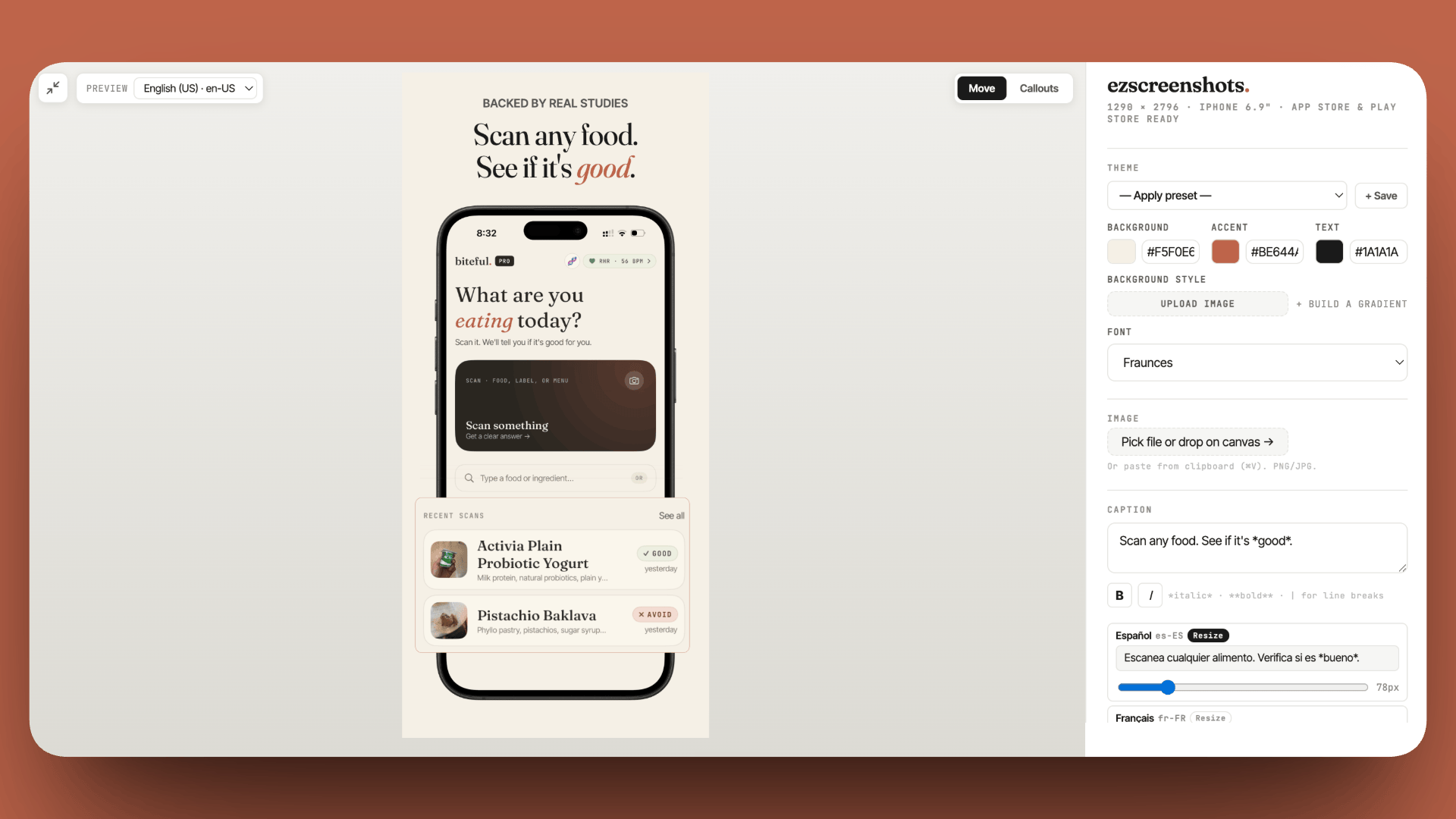
iPhone, iPad & Android
Plus Mac & Apple Watch — pixel-perfect presets for every size
Zoom Callouts
Highlight features with magnified overlays
AI Localization PRO
Translate captions to 19 languages in one click
Multiple Screenshots PRO
Edit all your screens at once, export as a ZIP
Product Features
Everything you need to make screenshots is already inside ez
Core workflows
Editor details
Loved by indie developers
"Actually pretty genius."
"This is exactly the kind of internal tool indie devs end up needing. Most screenshot makers are built like design suites, when the real need is just: drop screenshot, edit headline, export clean PNG."
 mufenglabs
"This tool will save indie devs so many hours honestly."
"As a designer of said screens all the freaking time... I have literally almost made something like this soooo many times."
hparamore
"Most indie devs spend 10x more time on the product than the thing that actually gets people to download it."
"This stopped me mid-scroll."
"Bruh this is awesome, and came just in time as I need to update all my screenshots. You hero."
te_abstract_art
"The hours indie devs lose to screenshot formatting is embarrassing for the ecosystem. This needed to exist."
"This is really amazing, this solves the problem of many app developers."
"Simple, easy to use, no BS. I love it. Thank you for creating this, I'll use it for my next app release."
Proof_Head7095
"Small apps like this is what I love. Makes workflow faster."
"Screenshot tools are deceptively complex. I built a quick one for ClipMaster and it ate 3 hours just for the basics. Respect to anyone solving this friction."
"Great job, it's nice when apps are limited and opinionated about their functionality like this."
WingnutWilson
"I literally just spent 20 minutes trying to figure this out with Mac native tools. It is a pain."
"This is absolutely fantastic... well done."
"Very nice, thanks for sharing! The cheap one time purchase convinced me. Will definitely revisit for a future iOS release."
BoerenkooI
"Nice, this is exactly the kind of tool people don't think about until they've wasted 3 hours in Figma."
"This is the universal need to every builder out there, really awesome."
"Love that it's just HTML + CSS. Really nice UI to see it change in realtime."
Human-Cherry-1455
"Love tools like this. Solving small but painful design tasks can save creators a ridiculous amount of time."
"The friction in App Store assets is usually underestimated until you're three hours deep into manual adjustments."
"Really clean tool man, well done. This is painful to do well."
atheistjebus
"This tool could be a game changer!"
"This will def save time for indie devs trying to launch."
"Thank you for the hard work. I'm definitely going to use it."
Heromimox
"Biggest win is having a template per size, then only swapping copy and screenshots."
"Pretty cool. I love the small ideas that hit just right."
E-S-
"That's really cool how simple and effective it is."
Ok_Difficulty_5008
"Dead simple is so underrated as a product strategy. Screenshots are one of those things that look easy but take forever to get right."
Leather-Part3037
"I just got done doing this for my app and it was a headache, would have been a great tool to have a few days ago."
alexnostahp
"App store screenshots are one of those small tasks that steal an afternoon."
Crescitaly
Free to start, $39/year to go unlimited
Make and export real screenshots on the free tier. Upgrade only when you need volume, languages, or extras.
- 1 full-resolution export per month
- All device sizes, frames, fonts & backgrounds
- Zoom callouts included
- Unlimited saved projects
- 100% client-side — screenshots stay on your device
- Unlimited full-resolution exports
- AI translation to 19 App Store locales
- Multi-screen ZIP export — every size & language at once
- 3D perspective tilt
- Emoji & badge overlays
Frequently asked
Is ezscreenshots really free?
Yes. The free tier gives you 1 full-resolution export per month with no watermark and no signup — enough to try the editor and ship a single screen. Pro lifts the export limit and adds AI localization, multi-screen export, and emoji & badge overlays for $39/year flat (or $9/mo).
Do I need design skills?
No. You drop a raw screenshot, type a caption, and pick a background — the editor handles layout, spacing, and export sizes for you. No layers, no rich-text toolbars, no templates to wrangle. The single canvas updates live as you edit.
Which devices and stores does it support?
Presets for iPhone, iPad, Mac, Apple Watch, and Android — sized exactly for App Store Connect and Google Play Console. See the full screenshot sizes guide or the App Store screenshot generator page for every dimension.
Are my screenshots uploaded anywhere?
No. ezscreenshots runs entirely in your browser. Your screenshots never leave your device — there's no backend, no account, and no upload. The exported PNG is generated locally and downloaded straight to your machine.
Can I make screenshots in multiple languages?
Yes, on Pro. AI translation localizes your captions into 19 App Store locales, and a single multi-screen ZIP export gives you every device size and language in one download. Here's how to localize without redoing them each time.
How is this different from Figma or Photoshop?
You could build screenshots in a general design tool, but you'd recreate the frames, export sizes, and per-language variants by hand every release. ezscreenshots is purpose-built for store screenshots: the sizes, frames, and localization are one click each, and exports are already named and dimensioned for App Store Connect and Play Console.
Do you have a free trial of Pro?
The free tier already gives you 1 full-resolution export per month with no watermark — enough to test a single screen. If you need more, the $9/mo plan is the lightest paid option, or annual Pro is $39/year for unlimited exports plus AI translation and multi-screen export.
Compare with other tools
Weighing your options? Here's how ezscreenshots stacks up against the popular screenshot makers.
Generate your store screenshots now
Free tier exports real, full-resolution PNGs. No signup, no watermark.
Launch App →